
Malware can infect Android devices using methods like unsafe apps or compromised downloads. While people often call these threats “viruses,” most Android infections are actually forms of malware such as adware or trojans. The good news is that many infections can be quickly removed.
What you need to know:
- Android malware often spreads through unsafe apps, fake downloads, or phishing links.
- The words virus and malware are often used interchangeably, but viruses are technically a subset of malware.
- Signs of infection can include slow performance, battery drain, and unexpected ads.
- Unknown apps or strange messages may indicate malware activity.
- Most Android malware can be removed by uninstalling suspicious apps or scanning the device.
- Security apps and some simple protective measures help prevent future infections.
How do you know if your Android phone has a virus or malware?
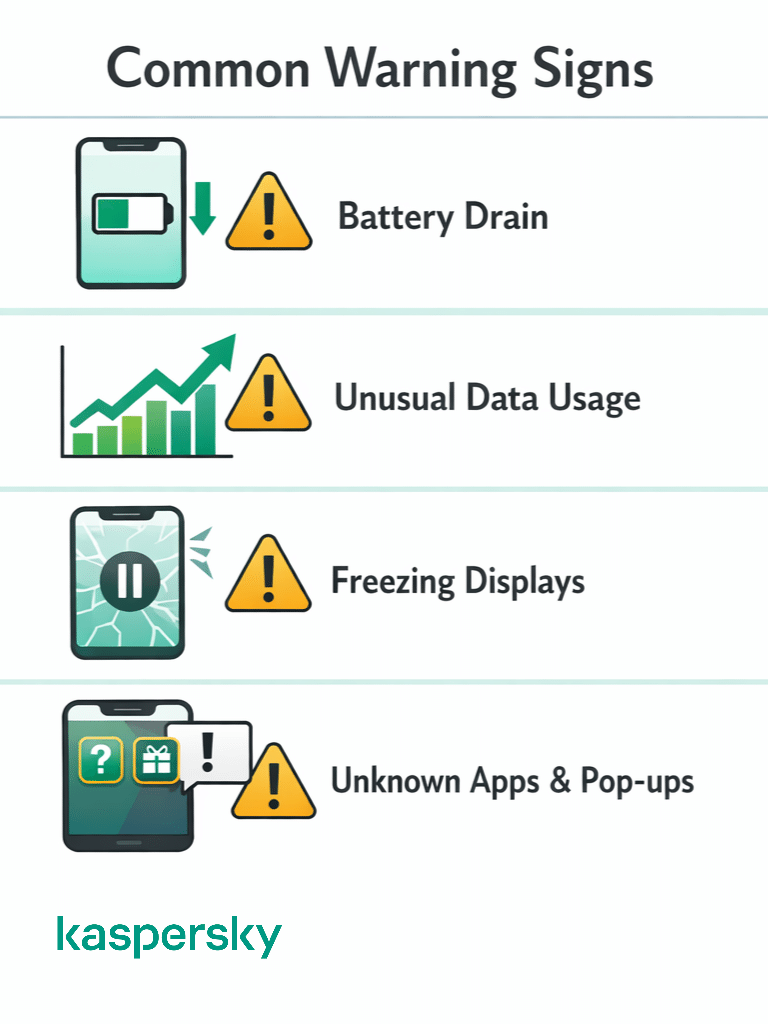
Android malware doesn’t usually announce itself. However, certain patterns can suggest something is wrong. Persistent problems combined with unusual activity may indicate malware or a virus on your phone.
Recognizing the warning signs early helps you remove the infection before it causes more damage.
Performance and battery problems
Malware often runs silently in the background. It can drain your battery faster than usual and slow down the overall performance of your phone or tablet.
You might also notice your device overheating or apps crashing more often than normal. Freezing displays can also be a bad sign. These can all happen for other reasons – it isn’t definite that they are symptoms of a virus.
Suspicious apps and pop-ups
Another warning sign is the appearance of apps you don’t remember installing. Malware sometimes installs additional apps without clear permission.
Persistent ads or aggressive pop-up notifications can also indicate adware or malicious software on the device. Some infections cause browser redirects, sending you to sites you didn’t plan to visit.
Data spikes or unusual activity
Some malware collects information and sends it to external servers. This can cause unusual spikes in data usage and transfer. You may be able to track this on your device.
Users may also notice unexpected SMS charges or messages sent from their phone without their knowledge. This is a red flag and can definitely signal malicious activity.
How to scan an Android phone for malware?
Antivirus software can scan your device to work out whether or not there are viruses or threats within. Malware scans should be thorough and give peace of mind to the user, and the best modern software can identify and remove malware quickly and automatically.
Protect your device
Kaspersky Premium offers various tools designed to protect your devices, including multilayered protection designed to prevent and neutralize viruses and malware.
Try Premium for FreeScan your phone with Kaspersky Antivirus for Android
Kaspersky Antivirus provides a straightforward method to scan your Android phone to find lurking threats.
- Download and install Kaspersky Antivirus for Android
- Open the app and tap ‘continue’ to allow access to system features.
- Tap ‘allow’ twice so that the app can make and manage phone calls and access necessary files on your phone.
- Tap ‘continue’ to allow access to phone and storage so the app can scan your device for threats.
- Select your location and tap ‘next’.
- Tap ‘accept and continue’ to accept the end user license agreement and Kaspersky security network statement.
- Tap ‘have an account’, ‘set up an account’ or you can skip this step for now.
- Tap ‘buy now’, that you ‘have an activation code’ or ‘use free version’.
- The app is now ready to scan your phone. Tap ‘run the scan’.
- If a virus is found, tap ‘remove’. Your phone is now virus free.
How do you remove malware or a virus from an Android phone?
Most Android infections come from malicious apps. Removing the app responsible usually eliminates the virus affecting the device.
The manual process focuses on isolating the problem by identifying suspicious apps, and then removing them safely. Understanding how to get rid of a virus on your phone allows you to quickly restore normal phone functionality.
Restart the phone in Safe Mode
This stops all third-party apps from running. If your phone stops behaving strangely in safe mode, the problem was almost definitely due to a malicious or malfunctioning app.
Identify suspicious apps
Check the list of installed apps in your Android settings. Look for apps you don’t recognize or ones installed shortly before the problems began.
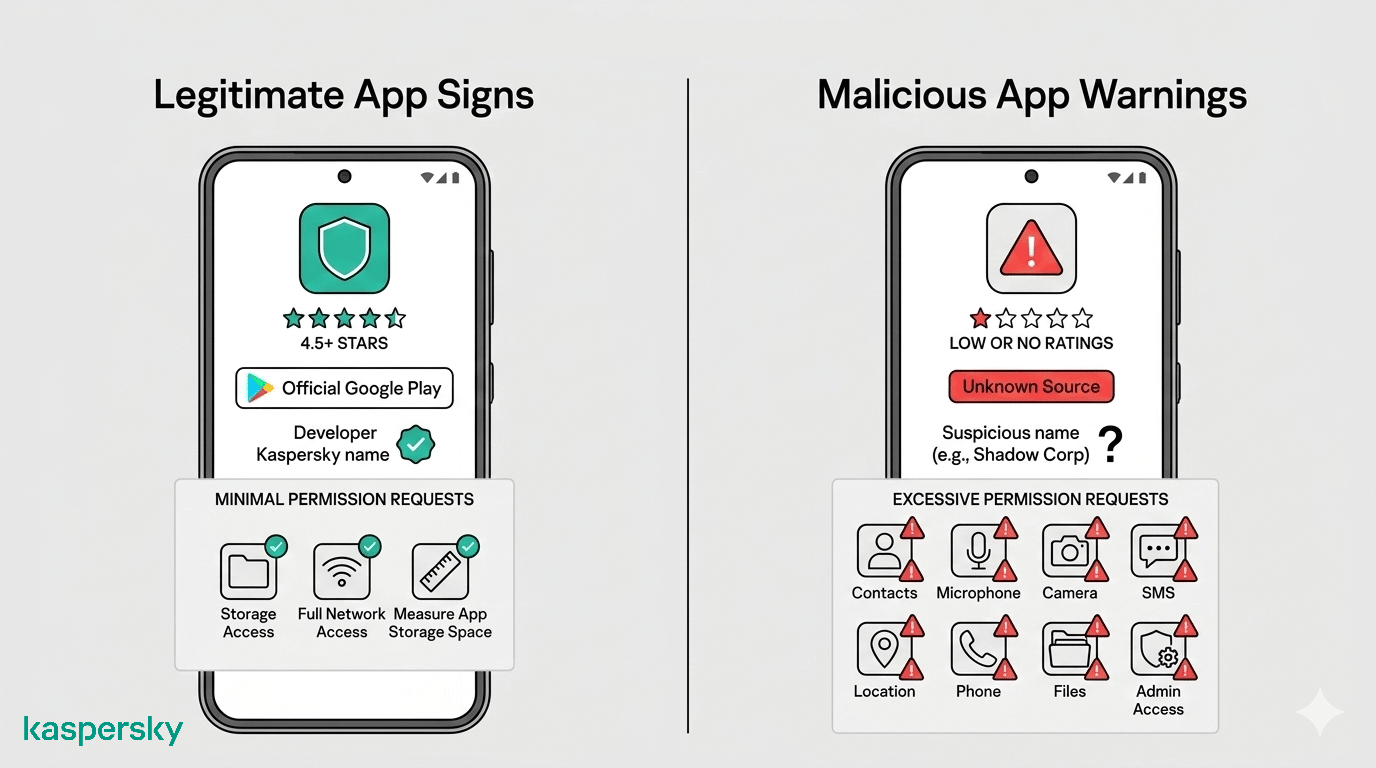
Apps with unusual names or that request excessive permissions unrelated to their function can also be signs of malicious software.
Uninstall malicious apps
Removing a suspicious app is usually straightforward. Simply select the app you suspect may be malicious and tap ‘uninstall’.
Disable device administrator permissions
Some malware protects itself by enabling device administrator access, which can prevent normal removal. If this is the case, revoke device admin access in ‘device admins’ within ‘security’. Then you will be able to uninstall.
What if malware cannot be removed from your Android phone?
Most Android malware can be removed by uninstalling the malicious app or running a security scan. However, some infections are more persistent and may continue causing problems even after obvious threats are removed.
Malware that resists removal
Some malware can reinstall itself or hide within other apps. This makes it harder to eliminate. You may continue seeing symptoms such as persistent ads or system slowdowns even after deleting suspicious apps.
If problems return after restarting the device or uninstalling apps, it may indicate deeper malware activity.
Performing a factory reset
If malware continues to affect your phone, a factory reset may be the most reliable solution. This process removes all apps and stored data, restoring the device to its original state.
Before resetting the phone, back up important data such as photos and contacts so you won’t lose them. After the reset, reinstall trusted apps carefully and avoid restoring suspicious apps.
Can Android phones get malware and viruses?
Android phones can be infected with malicious software. People commonly use the terms ‘malware’ and ‘virus’ interchangeably, but viruses are actually a subset of malware. The Android operating system is not immune to malware.
A virus is a specific type of malware that spreads by copying itself and infecting other files or systems. On Android, true self-replicating viruses are uncommon. Most mobile threats come in the form of malware apps. This might mean spyware, scareware, adware, or trojans that trick users into installing them. People regularly ask how to clean their phone from viruses once noticing something is amiss.
Android infections often happen when a malicious app is downloaded from an unsafe source or when a legitimate-looking app hides harmful code. These threats are usually easier to remove than traditional computer viruses once the malicious app is identified.
To easily protect yourself and your devices Kaspersky Antivirus for Android can protect your phone from all sorts of Android malware. Plus, it also detects and removes malware if your phone is already infected.
Malicious applications
Many Android infections start with malicious apps that appear legitimate. These apps may imitate games or other popular apps but contain hidden malware. The risk increases when installing apps from unofficial app stores or downloading APK files outside trusted platforms.
Malvertising
Malware can also spread through malicious advertising, sometimes called malvertising. Clicking deceptive ads may redirect users to unsafe websites or trigger downloads of harmful apps that infect the device.
Infected links
Hackers often use phishing emails or SMS messages to distribute malicious links. When a user taps these links, they may be taken to infected websites or prompted to download malware disguised as a normal app or update.
How can you protect your Android phone from malware?
Good security habits can significantly reduce the risk of malware infections on Android devices. Most threats rely on unsafe downloads or overly permissive apps. A few simple precautions can make a big difference. Knowing how to prevent a virus is always preferable to having to remove a virus from a phone.
Install apps only from trusted sources
Download apps from trusted platforms such as the Google Play Store whenever possible. Official stores perform security checks that help reduce the risk of malicious apps compared with unofficial marketplaces or random APK downloads downloaded on sites you can’t verify.
Keep Android and apps updated
Regular updates fix security vulnerabilities that attackers may exploit. Keeping both the Android operating system and installed apps updated helps close these gaps before malware can take advantage of them.
Review app permissions carefully
Before installing or using an app, check the permissions it requests. If an app asks for access that doesn’t match its purpose (a simple game requesting contact or microphone access, for instance) it may be a sign of suspicious behavior.
Related Articles:
- How to remove a virus from an iPhone?
- How can I ensure effective Spyware Detection on my Android device?
- What are the best practices for Android Security?
- What are the common signs of malware on your device?
Related Products:
FAQs
Can malware stay on your phone after uninstalling an app?
Usually uninstalling the malicious app removes the malware, but some threats may leave behind files or reinstall through related apps. Running a security scan helps confirm the device is clean.
Can Android malware spread to other devices?
Most Android malware does not spread automatically like traditional computer viruses. However, infected devices may send malicious links or messages that can infect other users.
How do Android phones get viruses?
Android phones usually become infected when users install malicious apps, download unsafe APK files, click infected links, or fall for phishing messages.
Can a virus hide on your Android phone without you noticing?
Yes. Some malware runs quietly in the background. It may collect data or display ads without obvious symptoms at first. Users may eventually notice slower performance or unexpected issues with their device.